FR French
BR Portuguese (Brazil)
PL Polish
IT Italian
DE German
US English (US)
ES Spanish

Contact Us

If you still have questions or prefer to get help directly from an agent, please submit a request.
We’ll get back to you as soon as possible.

Please fill out the contact form below and we will reply as soon as possible.

  • Contact Us
  • Submit a Diagnostic Report
Italian
FR French
BR Portuguese (Brazil)
PL Polish
IT Italian
DE German
US English (US)
ES Spanish
  • Home

Accesso remoto al display (RDA) in ExpertConnect

Written by Payton Douglass

Updated at May 6th, 2026

Contact Us

If you still have questions or prefer to get help directly from an agent, please submit a request.
We’ll get back to you as soon as possible.

Please fill out the contact form below and we will reply as soon as possible.

  • Introduzione per i responsabili
  • Introduzione per i consulenti
  • Gestisci la tua organizzazione
  • Gestione VoiceHub
  • Sostieni i tuoi clienti
  • Risoluzione dei problemi
  • Integrazioni
  • Aiuto per i consulenti
  • FAQ
+ More

I consulenti hanno la possibilità di avviare una sessione di accesso remoto al display (RDA) direttamente da un ticket ExpertConnect . Questo permetterà ai vostri consulenti di risparmiare tempo e clic rimanendo all'interno di un unico sistema: guardate questo video per scoprire come fare !
Come avviare una sessione RDA

  1. Recupera le informazioni JDLink dal computer connesso per aggiungere un numero di serie al ticket. Se non hai ancora collegato il tuo account ExpertConnect all'Operations Center, segui queste istruzioni .

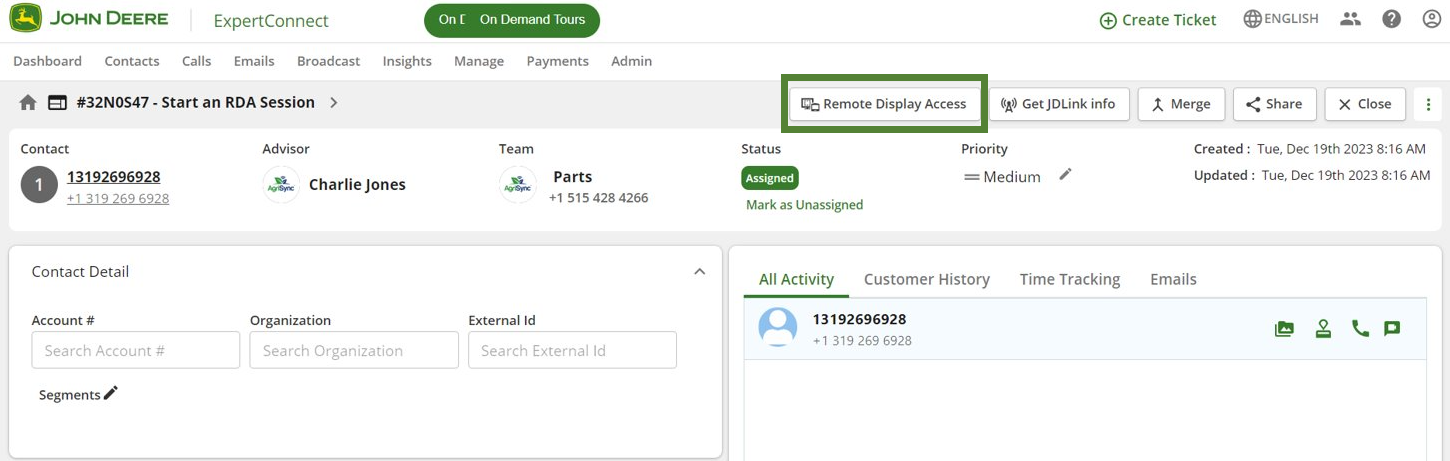
2. In alto a destra del biglietto, seleziona l'azione "Accesso remoto al display".
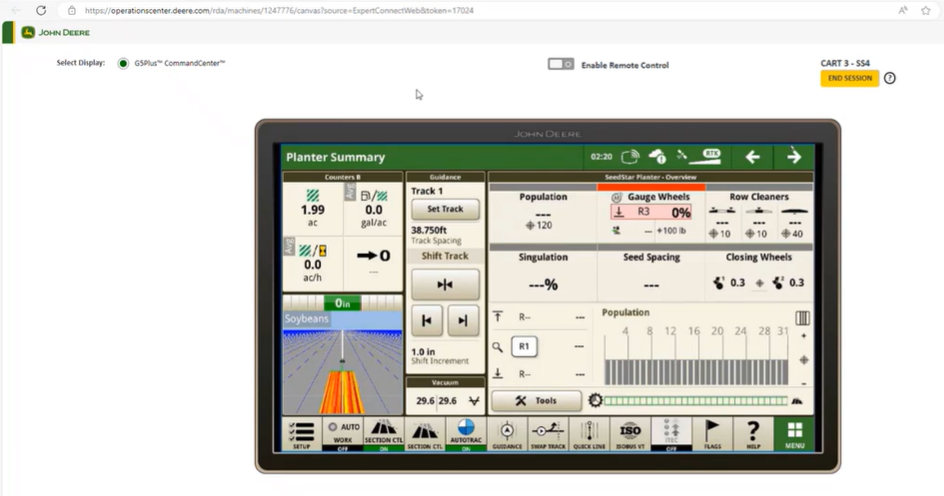
3. Verrai reindirizzato al Centro Operativo, dove potrai visualizzare il display. I consulenti possono abilitare il controllo remoto e selezionare " Termina sessione" in alto a destra una volta terminata la visualizzazione del display.

Se non riesci ad avviare una sessione RDA per la tua macchina, assicurati che il tuo cliente abbia seguito il passaggio 6 del nostro articolo di aiuto JDLink per concedere autorizzazioni aggiuntive per RDA.
Per ulteriori domande di supporto, si prega di aprire una segnalazione in ServiceNow.

remoto accesso

Was this article helpful?

Yes
No
Give feedback about this article

Related Articles

  • Opzioni di visibilità del team
  • Esporta contatti
  • Dashboard di approfondimenti
  • Risoluzione dei problemi relativi alla voce (jitter, latenza e elettricità statica)
  • Monitoraggio del tempo in ExpertConnect
Feedback

United States
  • Terms and Conditions

Content is protected by copyright. Copying, modifying, or reposting content is prohibited. Copyright © 2023 Deere & Company. All Rights Reserved


Knowledge Base Software powered by Helpjuice

Expand