Table of Contents
Your Dealership's IT organization may block access to certain websites or web functionalities. Please share this article with your IT department and ask them to ensure your network infrastructure is configured correctly to allow list the IPs, port ranges, and domains required for ExpertConnect and its features to function optimally.
Core Configuration
Add/allow/whitelist the following destination domains and the corresponding ports to your firewall configurations:
Domain
*.expertconnect.deere.comNote: The * above represents multiple sites under the expertconnect.deere.com domain name.
Requirements
- Allow HTTPS traffic (TCP port 443) for this domain.
-
Ensure that any ports required for real-time communication services are open, and the following should be considered:
- TCP 443 for HTTPS and WebSocket connections (primary requirement).
- No additional custom ports are typically required; all communication occurs over HTTPS.
- If your firewall uses FQDN filtering, please add the domain above to the follow list for outbound traffic.
Email Configuration
Dealerships with spam filters blocking any emails from ExpertConnect, including verification emails, can whitelist below dedicated IP address assigned from our Email Service Provider for ExpertConnect.
IP Address: 149.72.202.18 Subnet Mask: 255.255.255.255
VoiceHub Configuration
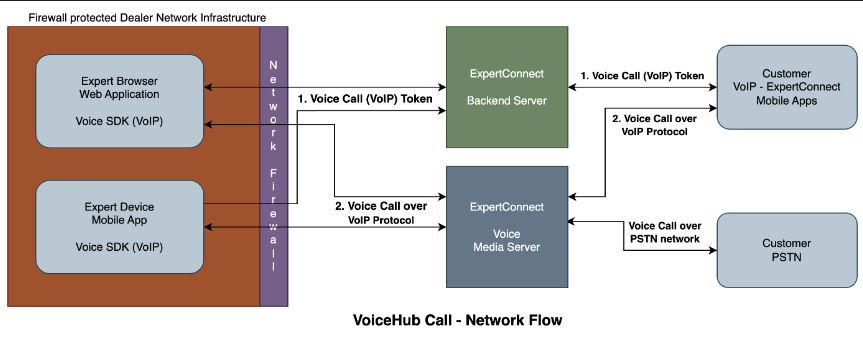
VoiceHub feature in ExpertConnect provides WebRTC & VoIP-based capabilities for real-time communication.
This can be categorized into two phases:
- Call control phase - Also known as Signaling (SIP/WebSocket) - This is the phase that handles the call's setup and control, for calls reaching the Expert's device on Web or Mobile apps or when the Expert initiates outbound calls via ExpertConnect - including the initiation, handshake, setting call internal routes, choosing the nearest edge server, configuration check, and connecting the call with the other participant.
- Call streaming phase - Also known as Media/RTP Streams - This is the phase that defines the time spent on a "connected" call, for the incoming and outgoing streaming audio for both participants.
If your location's firewall and internet filtering configurations are blocking these underlying mechanisms, you may experience:
- Intermittent call failures.
- Calls failing continuously or intermittently to ring in/out or connect with the other participant.
- Incoming and outgoing audio not heard at all or drops intermittently, with symptoms of one-way audio (caller can't hear callee or callee cannot hear caller or both) or silence.
- Features like transfers of call or DTMF (Press x) may not work as expected.
- Long delays in call control phase - for setup and connecting with the other participant
Signaling (SIP/WebSocket) - Control Phase
Web Application:
- Protocol: TCP
- Source IP: ANY
- Source Port: ANY †
- Destination:
- For Secure TLS to Call insights logging gateway
- eventgw.twilio.com
- For Secure TLS connection to Signalling Gateway
- voice-js.roaming.twilio.com
- For Secure TLS Connection to Regional Signalling gateways
- voice-js.ashburn.twilio.com
- voice-js.umatilla.twilio.com
- voice-js.sao-paulo.twilio.com
- voice-js.frankfurt.twilio.com
- voice-js.dublin.twilio.com
- voice-js.sydney.twilio.com
- voice-js.singapore.twilio.com
- voice-js.tokyo.twilio.com
- For Secure TLS to Call insights logging gateway
- Destination Port: 443
Mobile App - iOS and Android:
- Protocol: TCP
- Source IP: ANY
- Source Port: ANY †
- Destination:
- For Secure TLS to Registration Server
- ers.twilio.com
- For Secure TLS to Call Insights Gateway
- eventgw.twilio.com
- For Secure TLS connection to GLL Signalling Gateway
- chunderm.gll.twilio.com
- For Secure TLS Connection to Regional Signalling Gateways
- chunderm.au1.gll.twilio.com
- chunderm.br1.gll.twilio.com
- chunderm.de1.gll.twilio.com
- chunderm.ie1.gll.twilio.com
- chunderm.jp1.gll.twilio.com
- chunderm.sg1.gll.twilio.com
- chunderm.us1.gll.twilio.com
- chunderm.us2.gll.twilio.com
- For Secure TLS to Registration Server
- Destination Port: 443
† ExpertConnect Web and Mobile Apps will select any available port from the ephemeral range. On most machines, this means the port range 1024 to 65535.
Media/RTP Streams - Streaming Phase Servers
- Protocol: UDP
- Source IP: ANY
- Source Port: ANY †
- Destination IP Ranges: 168.86.128.0/18
- Destination Port Range: 10000-60000
† The Web and Mobile Apps will select any available port from the ephemeral range. On most machines, this means the port range 1024 to 65535.
Important: Ports need to be opened for both incoming and outgoing traffic.
Video Configuration
Video call is carried over WebRTC protocol, and the following domains and ports need to be whitelisted for two-way communication on Web and Mobile App - iOS and Android.
.agora.io
.edge.agora.io
.sd-rtn.com
.edge.sd-rtn.com
web-1.ap.sd-rtn.com
web-2.ap.sd-rtn.com
ap-web-1.agora.io
ap-web-2.agora.io
webcollector-rtm.agora.io
logservice-rtm.agora.io
rtm.statscollector.sd-rtn.com
rtm.logservice.sd-rtn.com
| Type | Protocol | Destination Ports |
| Video Web | TCP |
80; 443; 3433; 4700 - 5000; 5668; 5669; 6080; 6443; 8667; 9667; 30011 - 30013 (for RTMP converter) |
| Video Web | UDP | 3478; 4700 - 5000 |
| Signaling Web | TCP | 443; 6443; 9591; 9593; 9601 |
| Signaling Native | TCP | 8443; 9130; 9131; 9136; 9137; 9140, 9141 |
| Signaling Native | UDP | 1080; 8000; 8130; 8443; 9120; 9121; 9700; 25000 |
Note: Native in above context means Mobile App - iOS and Android.
Security FAQs
Q: Why so many ports?
A: Because of the nature of real-time communication using WebRTC/VoIP protocol, a range of addresses, ports, and transport protocols is needed.
Q: Is this inbound or outbound or does it affect traffic both ways?
A: These network and firewall configurations affect both inbound and outbound Voice (VoiceHub) call traffic.
Q: Why does ExpertConnect require such a large range of IP addresses/ports?
Q: Isn't it a security risk for us to have so many IPs/Ports open?
A: The IP range in the respective section is owned by our Communication Provider Vendor (referred to as CPV here on) and registered with ARIN. This is not an ephemeral IP range that is at risk of being recycled by our cloud providers and could potentially be used by another organization in the future. With this in mind, it is our CPV's position that this is a security improvement over the previous paradigm, despite the larger range(s).
It is a security risk to have any IPs/ports allowlisted. If an attacker can take over one IP or port from a given range, they can take over others, so the threat doesn't increase with the number of IPs or ports open.
Q: The size of the allow list is a concern. This gives the attacker more surface area to attach and does not provide the security cover we require.
A: Every RTP media session is negotiated by one of a few trusted RTC CPV's signaling edges. The IP/ports here refer to the RTC CPV service media edge. Thus, you should allow UDP traffic to be sent and received from the published IP address ranges. However, you do not need to open any additional IPs or ports on your side.
Q: Why don't other products have such broad requirements?
A: We can't speak for the decision-making processes of other products/offerings or their architectural designs, but we do see others with broadly similar requirements. For example, Telnyx has a single nonregional /19 IP range, and Zoom Phone and Zoom Contact Center have a UDP port range of 20000-64000 for reference.
Q: What about data privacy for voice, video, data exchange, and security?
A: ExpertConnect adheres to the security policies and standards set by Deere, focusing on protecting dealer data and privacy. This includes ensuring appropriate isolation of dealer-related activities. All RTC services integrated into ExpertConnect comply with these high standards, offering detailed information about their security measures and compliance policies. When selecting a Real-Time Communication SaaS provider, special attention is given to geo-routing and geo-fencing capabilities. This ensures that the selected vendor can provide an edge server close to the user, which is vital for efficient data routing. Regarding data privacy, our RTC services strictly avoid collecting personal data from users, except for IP addresses and necessary operational data for voice/video calls. ExpertConnec prioritizes user privacy, sharing only essential user data, such as an internal identifier, to set up call sessions. Voice and video call streaming is managed by the RTC CPV's Real-Time Network servers, utilizing geo-routing to match the user's cloud region. Deploying these RTC CPV SDKs within ExpertConnect does not permit other users to access or conduct unauthorized activities on the platform.
Additionally, as part of Deere, ExpertConnect regularly conducts vulnerability assessments and security audits, and implements protections against attacks. This is complemented by a defined process for reporting and mitigating any security concerns, ensuring ongoing vigilance and responsiveness to potential threats.
Q: We want to learn more about WebRTC.
A: WebRTC (Web Real-Time Communications) is an advanced protocol used for facilitating real-time communication capabilities such as voice, video, and data exchange directly within web browsers or through mobile applications. This technology establishes peer-to-peer connections between browsers and/or apps, which, while efficient, requires careful security configuration. WebRTC predominantly utilizes a spectrum of UDP ports, alongside occasional TCP ports, to enable this connectivity.
In terms of firewall configuration, WebRTC necessitates the opening of a broad range of ports, typically within the ephemeral port range (1,024 to 65,535 on most machines) for UDP traffic. This requirement stems from the protocol's utilization of ICE (Interactive Connectivity Establishment) and “hole punching” techniques, which are essential for navigating through firewalls and Network Address Translation (NAT) systems. This method is crucial for enabling peers situated on disparate networks to locate and connect without the intermediation of a central server.
Although the necessity for multiple open firewall ports might initially appear as a significant security concern, it is crucial to recognize that WebRTC is inherently designed to support secure communications using DTLS (Datagram Transport Layer Security) and SRTP (Secure Real-time Transport Protocol). The potential security risks can be effectively mitigated through strategic network configuration and the adoption of supplementary security protocols. Firewalls, for instance, can be configured to allow only outbound connections initiated by internal hosts, preventing externally initiated connections. Furthermore, the deployment of additional safeguards, such as Virtual Private Networks (VPNs), can offer an extra layer of security. In summary, while the implementation of WebRTC requires opening a range of firewall ports, the security risks are manageable and can be substantially alleviated through judicious network management and the application of robust security measures.
ExpertConnect has integrated with CPV services to facilitate voice/video calls, utilizing the WebRTC/Signaling protocol. This advanced protocol necessitates the pre-approval of certain domains and ports within security-restricted networks. The domains specified are crucial for the initiation and execution of voice/video calls through ExpertConnect's web and mobile platforms.
Q: This configuration isn't going to work for us?
IT Admin TL;DR
This section provides a consolidated checklist for IT administrators to configure firewalls and network infrastructure for ExpertConnect.
Core Domain & HTTPS
Required for: Main application access
- Domain: *.expertconnect.deere.com
- Protocol: TCP
- Port: 443 (HTTPS/WebSocket)
- Direction: Outboard (allow return traffic)
Email Service
Required for: Email delivery (verification, notification)
- IP Address: 149.72.202.18/32
- Subnet Mask: 255.255.255.255
- Action: Whitelist in spam filters
VoiceHub - Video Calling
Signaling Servers (Call Control)
Web Application:
- Protocol: TCP
- Port: 443 (HTTPS/WebSocket)
- Source: ANY (ephemeral ports: 1024-65535)
-
Destinations:
- eventgw.twilio.com
- voice-js.roaming.twilio.com
- voice-js.ashburn.twilio.com
- voice-js.umatilla.twilio.com
- voice-js.sao-paulo.twilio.com
- voice-js.frankfurt.twilio.com
- voice-js.dublin.twilio.com
- voice-js.sydney.twilio.com
- voice-js.singapore.twilio.com
- voice-js.tokyo.twilio.com
Mobile Apps (iOS/Android):
- Protocol: TCP
- Port: 443
- Source: ANY (ephemeral ports: 1024-65535)
-
Destinations:
- ers.twilio.com
- eventgw.twilio.com
- chunderm.gll.twilio.com
- chunderm.au1.gll.twilio.com
- chunderm.br1.gll.twilio.com
- chunderm.de1.gll.twilio.com
- chunderm.ie1.gll.twilio.com
- chunderm.jp1.gll.twilio.com
- chunderm.sg1.gll.twilio.com
- chunderm.us1.gll.twilio.com
- chunderm.us2.gll.twilio.com
Media Servers (Audio Streaming)
- Protocol: UDP
- Source IP: ANY
- Source Port: ANY (ephemeral ports: 1024-65535)
- Destination IP Range: 168.86.128.0/18
- Destination Port Range: 10000-60000
- Direction: BOTH incoming and outgoing
Video Calling
Domains by Whitelist
.agora.io
.edge.agora.io
.sd-rtn.com
.edge.sd-rtn.com
web-1.ap.sd-rtn.com
web-2.ap.sd-rtn.com
ap-web-1.agora.io
ap-web-2.agora.io
webcollector-rtm.agora.io
logservice-rtm.agora.io
rtm.statscollector.sd-rtn.com
rtm.logservice.sd-rtn.comPorts by Platform
| Platform | Protocol | Ports |
| Web - Video | TCP | 80, 443, 3433, 4700-5000, 5668, 5668, 6080, 6443, 8667, 9667, 30011-30013 |
| Web - Video | UDP | 3478; 4700-5000 |
| Web - Signaling | TCP | 443; 6443, 9591, 9593, 9601 |
| Mobile - Signaling | TCP | 8443, 9130, 9131, 9136, 9137, 9140, 9141 |
| Mobile - Signaling | UDP | 1080, 8000, 8130, 8443, 9120, 9121, 9700, 25000 |
Implementation Checklist
- Whitelist domain: *.expertconnect.deere.com on port 443 (TCP).
- Whitelist email IP: 149.72.202.18/32 in spam filters.
- Allow outbound TCP port 443 to all signaling domains (listed above).
- Allow outbound UDP ports 10000-60000 to IP range 168.86.128.0/18.
- Allow inbound UDP ports 10000-60000 from IP range 168.86.128.0/18.
- Whitelist all video call domains (listed above).
- Allow video call ports (TCP/UDP as specified in table above).
- Configure firewall to allow ephemeral source ports (1024-65535).
- Test connectivity using ExpertConnect Diagnostics & CPV Network Test Tool.
- Document all changes for future reference.
Testing and Validation
After implementing these configurations:
- Test voice calling functionality in ExpertConnect.
- Test video calling functionality in ExpertConnect.
- Verify email delivery (check spam/junk folders).
- Monitor firewall logs for any blocked connections.
- Use above mentioned network and diagnostics test tools to validate connectivity.
Support Contact
If you encounter issues after implementing these configurations, please contact your Deere ExpertConnect support team with:
- Firewall logs showing blocked connections
- Specific error messages from ExpertConnect.
- Results from the ExpertConnect Diagnostics & CPV Network Test Tool
Proxy Services
Various proxy services can be made available if the above is not working. Please email expertconnect@johndeere.com and include a member of your IT team.
Still Having Trouble?
If you are still having problems, please email expertconnect@johndeere.com and include a member of your IT team.