FR French
BR Portuguese (Brazil)
PL Polish
IT Italian
DE German
US English (US)
ES Spanish

Contact Us

If you still have questions or prefer to get help directly from an agent, please submit a request.
We’ll get back to you as soon as possible.

  • Submit a Diagnostic Report
English (US)
FR French
BR Portuguese (Brazil)
PL Polish
IT Italian
DE German
US English (US)
ES Spanish
  • Home
  • Ticket Functionality
  • Basic Ticket Functionality

Tracking Time in ExpertConnect

Written by TJ Salyars

Updated at June 10th, 2026

Contact Us

If you still have questions or prefer to get help directly from an agent, please submit a request.
We’ll get back to you as soon as possible.

  • Getting Started for Advisors
  • Getting Started for Managers
  • Ticket Functionality
    Basic Ticket Functionality Advanced Ticket Functionality
  • Contact Management
  • Insights
  • Manage Team Settings
    Team Settings VoiceHub Settings Chat Settings EmailHub Settings WhatsApp
  • Manage Company Settings
  • Admin Page Settings
  • Integrations
  • Mobile App Functionality
  • Best Practices
  • Troubleshooting
  • FAQ's
+ More

Table of Contents

Mobile App Web Dashboard
⚠️ This article has moved

This article is now maintained here. Please refer to this and the ExpertConnect Knowledge Base for the latest content.

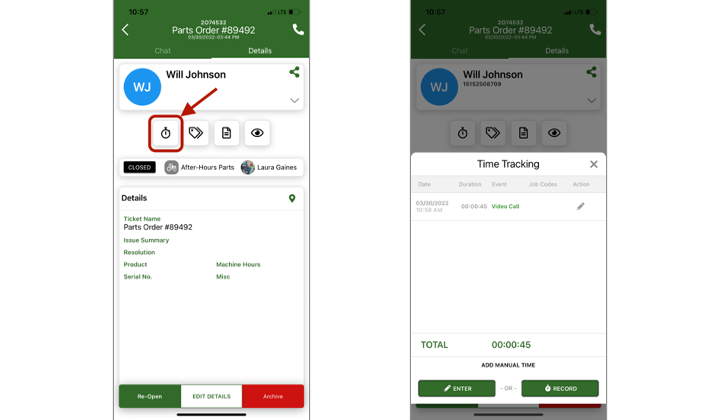
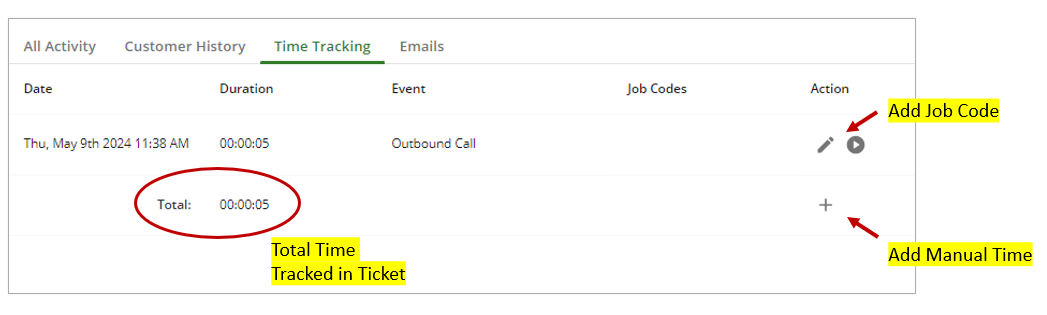
ExpertConnect will automatically track phone and video call time durations within a ticket. Advisors can also manually track their time within a ExpertConnect ticket to record activities that didn't automatically track.

You can add manual time in the Time Tracking section of a ticket. The total time tracked in a ticket will be available when you Download Ticket Reports. You can also add Job Codes to timed activities in a ticket.


Mobile App


Web Dashboard


You may also monitor how quickly your team responds to unassigned tickets with the Time to First Response metric found in the Dashboard tab on the web browser. This metric displays the median time to act on an unassigned ticket within the last 14 days.

expertconnect time tracking

Was this article helpful?

Yes
No
Give feedback about this article

Related Articles

  • Create A New Ticket
  • Customer Ticket History
  • Viewing & Editing Tickets on the Web Dashboard
  • Ticket Tags
  • Private Notes & Attachments Within a Ticket
Feedback

United States
  • Terms and Conditions

Content is protected by copyright. Copying, modifying, or reposting content is prohibited. Copyright © 2023 Deere & Company. All Rights Reserved


Knowledge Base Software powered by Helpjuice

Expand